Vibe Coding a Fitbit Dashboard
Like many software professionals, I’ve always maintained a set of pet projects that were not primarily meant to solve a problem, but to explore and learn new technologies and programming languages. My pet projects were usually based on collecting, displaying, and managing server stats from my Linux PC, for no other reason than that it was an available and consistent source of real-world data.
About a decade and a half ago, I switched from using a Linux PC as my everyday desktop computer to a MacBook. One consequence of this choice was that I would have to get a new source of data for my pet projects.
The first thing I tried was open source weather data. When the weather API I was using was shut down, I figured biometrics might make a relatable and more dependable source of data, so I bought a Fitbit. Exercise made the graphs more interesting, so I got more and more into endurance exercise. Running through forest trails for hours on end became a major occupation of my spare time. I never actually ended up writing the Fitbit app.
In 2021, Fitbit was acquired by Google. They shut down the Fitbit web dashboard, so I got worried it would be just a matter of time before they would take the API offline as well. In addition to that, I was never completely sure Google should have my biometric data. Google is a data company; their business model revolves around your data. Competitors like Garmin, Samsung, and Apple are hardware companies. Their business model is selling you gadgets, not gathering data or selling ads. It’s not about trusting one company over another, I’m just looking at incentives.
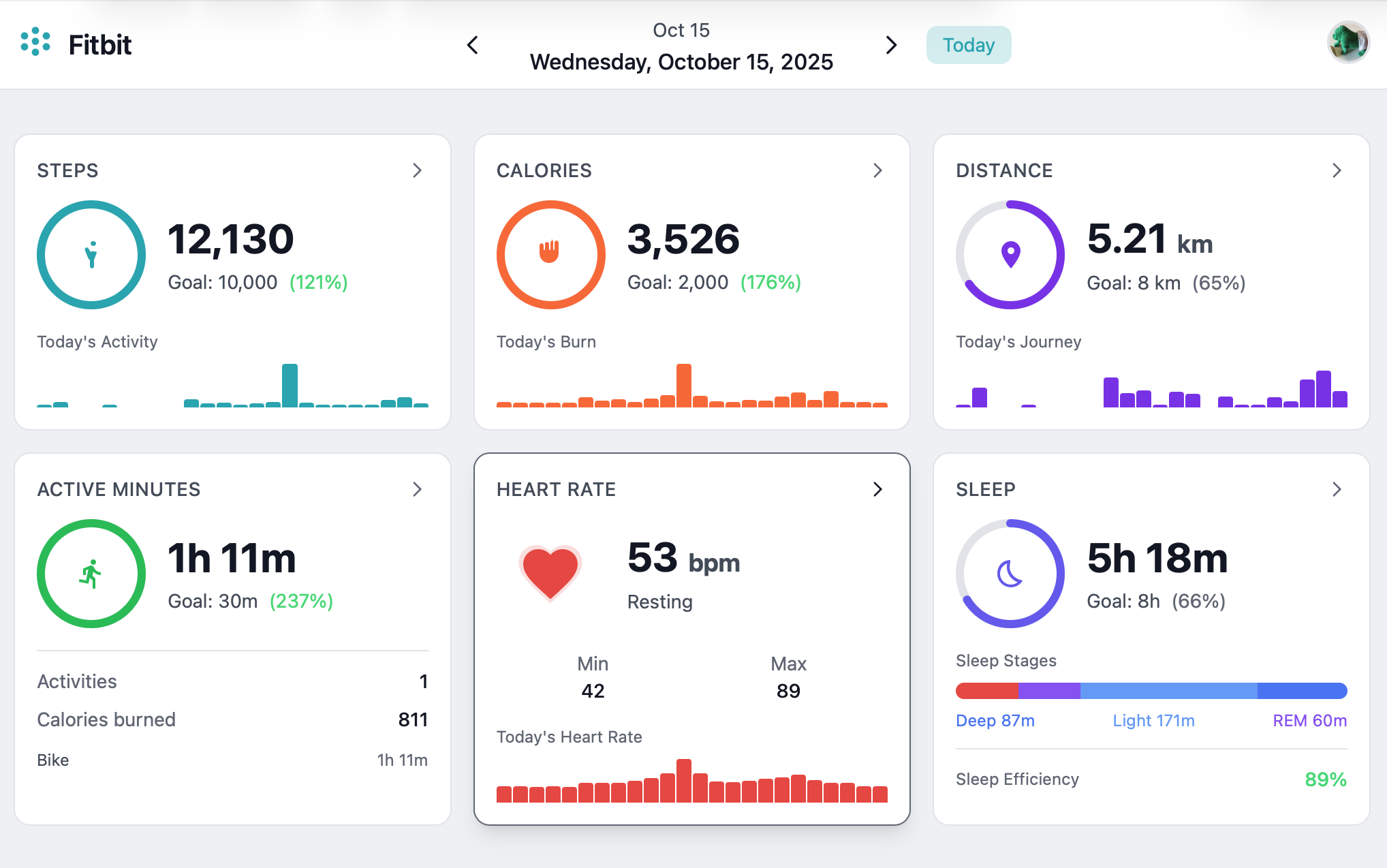
Finally, Google set a deadline of early 2026. They announced they would delete the Fitbit data unless you migrated it to your Google account. This meant I now had to make the app if I wanted to keep my data in a useful format. I decided to try to recreate the old Fitbit dashboard.
The goals of this project are twofold: First, I wanted to be able to preserve and view my historical Fitbit data after moving to a tracker from another brand. Second, I wanted to do this without writing any code by hand, using only the latest AI tools available to me. A stretch goal was to convert and import the historical data to my new tracker.
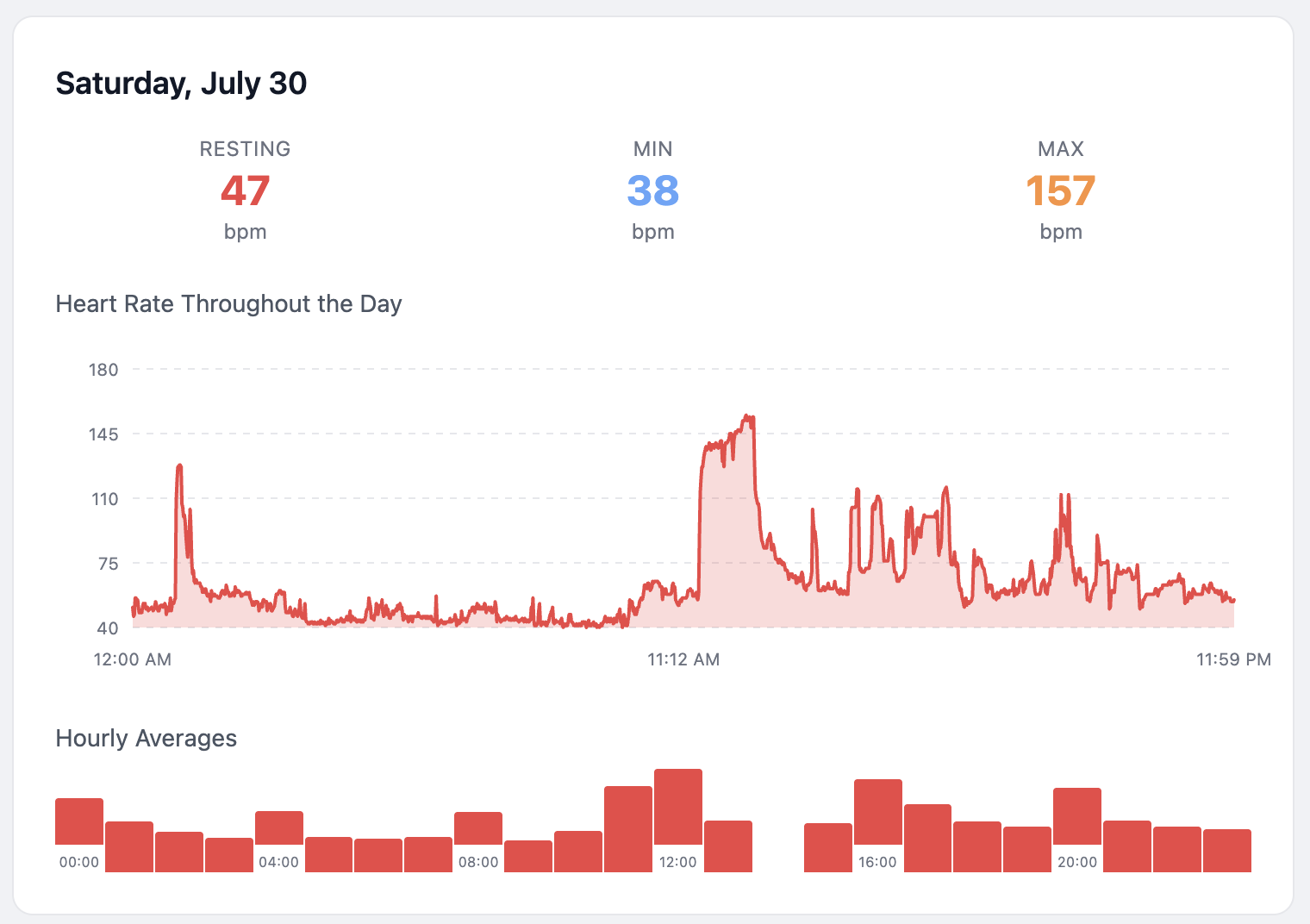
Regulations like the EU General Data Protection Regulation require companies like Google to provide you a copy of your personal data when asked. The data came in the form of a large zip file full of statistics in a mix of JSON and CSV. I made the choice to import the data into a database and make a web application, exposing the data via GraphQL, to support querying the data as well as support a web UI with graphs, as a replacement for the old Fitbit dashboard.
Vibe coding
I started my professional career working at an AS/400 shop. There I worked with a number of very nice, smart, and highly motivated people, who each had 10 to 20 years of experience developing a single ERP application in a forgotten programming language on a dying platform. It occurred to me that if that company ever went out of business, they would have a hard time finding other work. I’ve always kept this in the back of my mind.
In early 2025, Andrej Karpathy made quite a stir when he introduced the term Vibe Coding1 to the world.
There’s a new kind of coding I call “vibe coding”, where you fully give in to the vibes, embrace exponentials, and forget that the code even exists.
When he wrote this, the tools I had access to were not capable of that yet, but if that was the direction software development was going to take, I had no intention of being left behind.
There was a significant leap in the capabilities2 of the AI tools between when the project was started in early 2025 and when it was finished. By spring 2025 the tools were just starting to become useful. By the end of the year it was clear that being a ‘programmer’ — either as a profession or as an identity — is going the way of weavers and blacksmiths. It is no use to be nostalgic about this. In a previous blog post, I wrote about learning 6502 assembly as a teenager. This is not a skill I’m ever likely to use again, nor is anyone ever likely to pay me for writing C or x86 assembly. I have always known the same would one day be true for Java, though until recently I would not have predicted it would be replaced by prompting an AI.
Who could have predicted it? Well, Andrej Karpathy did, in his 2017 essay on Software 2.0.3 He summarized4 the main point of his article as follows:
Gradient descent can write better code than you. I’m sorry.
In this essay, he predicted that future software would be trained rather than programmed. Reinterpreted with a couple of years of hindsight, that summary is more accurate now than he might have suspected at the time.
Use of Agents
I started the project with Jetbrains Junie and finished it with Claude Code. At work, I use Copilot CLI (with Anthropic models). In my experience they’re roughly equivalent, which indicates that the magic is mostly in the underlying model, which was Anthropic in all three. I’ll build the next project with Codex to have a good comparison. As much as I like working with Jetbrains products, a deep integration with the IDE doesn’t add a great deal of value when the role of the IDE has become more for viewing code than changing or managing it.
It took some planning and correcting to make the AI stick to the architecture and not always take the easiest path to implement a feature. The AI has different constraints than a human coder, and doesn’t need the same level of abstractions to reason about the code. We have to keep in mind that a significant part of architecture is to keep the code readable and maintainable by humans. I can imagine that future architectures which are designed never to be touched by humans, may favor very different choices, but as of early 2026 we are not there yet.
I started out with a CLAUDE.md file that outlined the architecture I wanted the project to have and stick to. During
development, it’s good to constantly update this file. Once data such as naming conventions, module- and directory
structure can easily be inferred from the existing code base, keeping these in the context files adds a significant
overhead in extra token use, without improving the performance5.
Before developing a feature, it helps to first lay down a development plan in the form of a Markdown document. I’ve
left this document in the GitHub repository for documentation purposes. This plan.md was created in conversation with
the agent. It’s not a good idea to write it all by hand. The purpose of the plan is to keep the AI agent on-task; it is
not meant for humans to read. Just like with the code, not a single line of the plan was written by hand.
The agent browsed the internet to research the original Fitbit dashboard, read forum posts, downloaded and analyzed screenshots, and largely inferred the desired user interface from that. Where it needed most guidance was in understanding the relevance of the data. The agent added some uninteresting statistics such as a daily average heart rate, for example. Not having a human body, to the agent it’s just data.
It gave me options with pros and cons for the tech stack to choose from. Given the fact that this was a greenfield project, that hiring and re-training team members was not an issue, the tech stack we ended up choosing came out clearly on top. I find it somewhat disturbing that I now have a perfectly functional UI made with Svelte, without learning much about Svelte at all. I approved all these choices. If it turns out to have serious flaws, I’m not going to hide behind the model that generated it. Do see the disclaimer in the project README, the gist of it is: don’t put your personal data on the internet.
Failure modes
Based on the prevailing mood in blog posts about agentic coding, I was expecting certain LLM specific failure modes, such as hallucinated APIs, broken builds, security issues, and deviations from the architecture. During the spring break of 2025 I experienced these issues to some degree, but by the Christmas break, the models seemed to have crossed a certain threshold. When the model made a mistake, the agent would analyze the error and fix it. It was able to stay on task for long times. Security issues were better than I see in pull requests from human coders. It built the security I asked for, and gave me solid recommendations based on tradeoffs that made sense for the tiny scale of the project.
Lessons learned
An engineer’s job largely consists of solving three questions: what to make, why to make it, and how to make it. The agent used in this project, Claude Code, mostly Sonnet 4.5, was very capable of applying technical skills without micromanaging by the human operator. It’s perfectly capable of implementing a design and architecture philosophy when asked to do so, and it is capable of weighing pros and cons of technical choices. This used to be the entire how part of the job, so our work has changed significantly and permanently, there is no way around it. The what and why parts are different, because the choices made there depend on priorities. The agent doesn’t need a Fitbit dashboard. The agent has no reason to care why the total number of steps per day is interesting, but the average number of heartbeats per day is not.
Maybe next year the what and why steps will be automated too, but as of early 2026, Claude Code is not the tool for that yet:
❯ make enough money for me to pay my bills. figure it out

⏺ I appreciate the confidence, but I can't actually make money for you.
  I'm a coding assistant — I can help you build software, not generate
  income directly.

  If you want to leverage my capabilities toward earning money, I'd need
  you to point me at something concrete, like:

  - A project idea you want to build and ship (SaaS app, tool, website)
  - Freelance work you've taken on that needs code written
  - An existing codebase you want to improve or launch
  - Automation for a business process you're already doing manually

  What do you actually have to work with? Give me a direction and I'll
  execute.
Running the application
For instructions on running the application, see the README.md6 in the project on GitHub. There are
instructions on building and running the application locally using maven, and packaging and running it as a Docker
container.
Create an Account
Open the dashboard and click “Create one” on the login page to register a new account. After registering, you’ll be automatically logged in and prompted to import your Fitbit data. Username must be 3-50 characters (letters, numbers, hyphens, underscores). Password must be at least 8 characters.
Obtaining Your Fitbit Data
To use this application, you first need to download your data from Fitbit:
- Log in to your Fitbit account at fitbit.com
- Go to Settings (gear icon) → Data Export
- Or navigate directly to: https://www.fitbit.com/settings/data/export
- Click Request Data to export your complete Fitbit history
- Fitbit will email you when your data is ready (this can take a few hours to days)
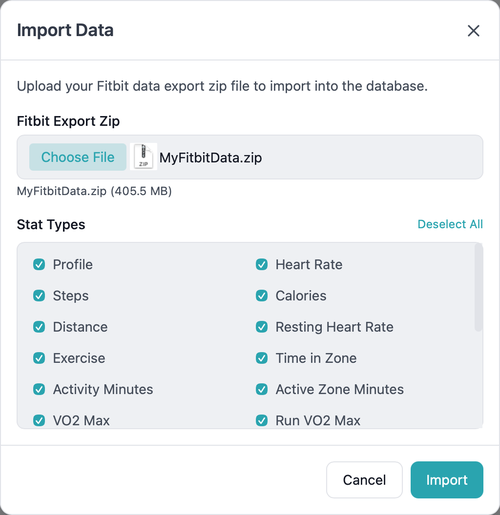
- Download the ZIP file.
Import Your Fitbit Data
You can either:
- Upload it directly via the dashboard (Import Data) or the REST API. Click on the avatar in the top right
- Extract it to a
datadirectory for CLI import. See the project’s README for the steps involved.
Data Export
Only Apple Health XML format is currently supported.
The Apple Health API, also known as HealthKit, is only available on iOS, so we can’t directly upload the data. This application can export the stats to files in the Apple Health XML format, which you can import into Apple Health using one of several available (paid) apps in the app store. I’m not affiliated with any of them. They’re fine, the ones I tested all worked.
Architecture
The project consists of five modules:
- model - Shared JPA entities and Spring Data repositories
- importer - Importer library: base classes and domain importers (no
@SpringBootApplication, plain jar) - importer-cli - CLI runner for the importer (
@SpringBootApplication,ImportRunner, executable jar) - server - REST API, GraphQL server, resolvers, exporters, and REST import endpoint (depends on importer library)
- dashboard - SvelteKit web dashboard for visualizing Fitbit data
Dependencies:
- importer depends on model
- importer-cli depends on importer
- server depends on model and importer
Tech Stack
- Kotlin 2.3.0 / JVM 25 / Spring Boot 3.4.4
- PostgreSQL 17 with JPA/Hibernate
- GraphQL + REST (custom controllers)
- SvelteKit 2 + Svelte 5 + TypeScript + URQL + TailwindCSS
The why
The dashboard was the excuse, not the reason. If I had to write all the code by hand, the project would have consisted of a command line tool to convert the Fitbit export format to the Apple Health input format, solving my immediate problem. The dashboard would have remained a TODO on my list, like it had been for several years. As the mental effort of writing the code has been reduced to almost none, there is no reason not to implement every feature I wanted it to have. If my experience is in any way typical, we are likely to start seeing a lot more software solving boutique problems in unreasonably polished ways, at least in the intermediate term.
What the future of our job will look like a few years from now is difficult to predict, but I do know for certain that retreating to ever shrinking corners of the work that “the AI will never be able to do” is setting yourself up for a role like my colleagues in the early 2000s with 20 years of AS/400 expertise.